Is your website ready for AI search? A checklist for ChatGPT, Perplexity and Claude
To show up in answers from ChatGPT, Perplexity, Claude or Google’s AI Overviews, a site has to pass three tests: AI crawlers are allowed to read it, its pages are indexable and easy to parse, and its content clearly says who you are and what you offer. None of this needs special tricks; it is mostly classic technical SEO plus a few new robots.txt rules. Here is a practical checklist you can go through in an hour.
Check where your site stands: the free website audit has an “AI search readiness” card that tests the points below automatically.
How AI assistants find and cite websites
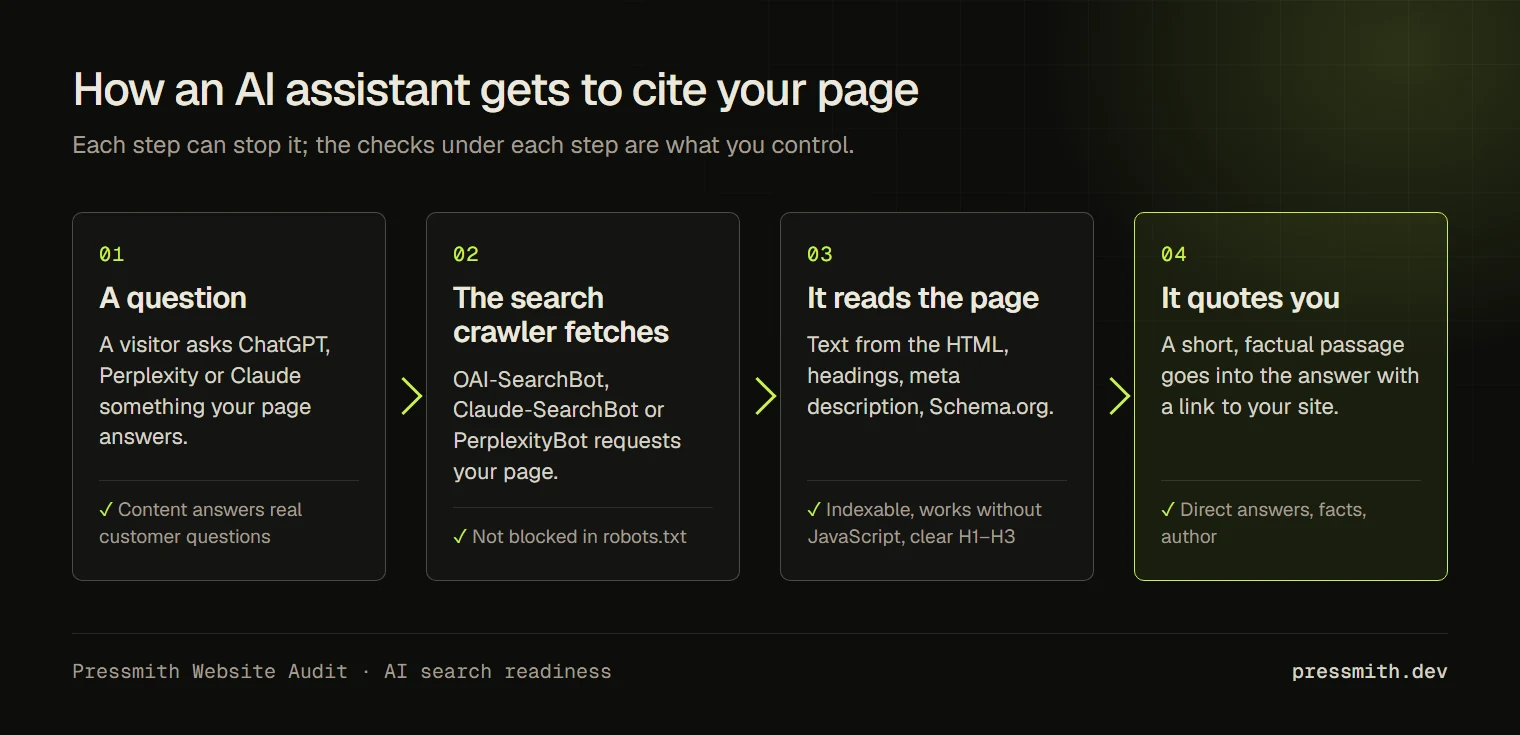
AI assistants answer from two sources: what the model learned during training, and pages they fetch live when they search the web for a question. The second part is where your site can be cited with a link. For that, the assistant’s search crawler must be allowed to fetch your pages, and your pages must answer the question in plain, quotable sentences.
No tool can guarantee that an assistant will cite a particular site. What you can do is remove the technical reasons it could not.
Step 1. Allow AI crawlers in robots.txt
Each AI company uses separate crawlers for training and for search. Blocking the training crawler does not have to block the search one, so decide for each.
| Company | Search and live answers | Model training |
|---|---|---|
| OpenAI (ChatGPT) | OAI-SearchBot, ChatGPT-User | GPTBot |
| Anthropic (Claude) | Claude-SearchBot, Claude-User | ClaudeBot |
| Perplexity | PerplexityBot, Perplexity-User | — |
| Google (Gemini) | regular Googlebot | Google-Extended |
| Apple | regular Applebot | Applebot-Extended |
If you want to appear in AI answers, make sure the search crawlers in the first column are not disallowed. A common accident: a hosting provider or a security plugin adds a block list to robots.txt, and AI bots end up on it next to aggressive scrapers. Open yoursite.com/robots.txt and look for Disallow: / under any of these names.
Note that Google-Extended only controls whether your content is used for Gemini; it does not remove you from Google Search or AI Overviews, which use the normal Googlebot.
Here is a robots.txt that lets AI assistants search and quote your site but keeps your content out of model training. Several User-agent lines in a row share the rules below them:
# AI search and live answers: allowed
User-agent: OAI-SearchBot
User-agent: ChatGPT-User
User-agent: Claude-SearchBot
User-agent: Claude-User
User-agent: PerplexityBot
User-agent: Perplexity-User
Disallow: /wp-admin/
Allow: /

# Model training: your choice (here: not allowed)
User-agent: GPTBot
User-agent: ClaudeBot
User-agent: Google-Extended
User-agent: Applebot-Extended
Disallow: /

# Everyone else, including Googlebot and Bingbot
User-agent: *
Disallow: /wp-admin/
Allow: /wp-admin/admin-ajax.php

Sitemap: https://example.com/sitemap_index.xml
Want to allow training as well? Change Disallow: / to Allow: / in the second group. A crawler follows only the most specific group that names it, so each group needs its own rules.
Step 2. Make pages indexable and easy to read
- The page is not closed with
noindex, and the canonical URL points to itself. - A sitemap lists your important pages and is referenced in robots.txt.
- The main content is in the HTML, not loaded only by JavaScript after the page opens. Many AI crawlers do not run JavaScript.
- One clear H1 per page, then H2 sections and H3 subsections without skipped levels: assistants use headings to find the part that answers a question.
- A meta description that summarizes the page in one or two sentences.
- Text without obvious spelling mistakes. It sounds minor, but errors make a source look less reliable.
Step 3. Describe your business with structured data
Schema.org markup tells machines, not only people, who is behind the site. For a company add Organization (or LocalBusiness for a place customers visit) with name, logo, URL, contacts and sameAs links to your official profiles. For articles add Article with an author. For a person, Person with a job title and profiles.
sameAs deserves a special mention: it connects your site with your LinkedIn, Facebook, GitHub or Wikipedia pages, so an assistant can confirm that these profiles and the site belong to the same entity.
A minimal Organization block looks like this. SEO plugins such as Rank Math or Yoast generate it from their settings, so usually you only fill in the fields there:
<script type="application/ld+json">
{
  "@context": "https://schema.org",
  "@type": "Organization",
  "name": "Example Studio",
  "url": "https://example.com/",
  "logo": "https://example.com/logo.png",
  "email": "hello@example.com",
  "telephone": "+380 44 000 0000",
  "sameAs": [
    "https://www.linkedin.com/company/example",
    "https://www.facebook.com/example",
    "https://github.com/example"
  ]
}
</script>
Step 4. Write content that is easy to quote
- Answer the question in the first two sentences, then explain. Assistants quote short, self-contained statements.
- Use concrete facts: numbers, prices, dates, locations, names of services.
- Keep one topic per page instead of long pages about everything.
- Add a FAQ section with real customer questions and direct answers.
- Show who wrote the content and why they are qualified to.
Step 5. llms.txt: optional, not a ranking factor
llms.txt is a proposed file at the root of the site (/llms.txt) with a short Markdown summary of the site and links to the most important pages, meant for language models. It is a community proposal, not an official standard, and the major assistants have not confirmed that they use it. It takes ten minutes to create, so it does no harm to add one, but do not expect it to change anything on its own.
The format is plain Markdown: a heading with the name, a one-line summary in a quote, a few sentences of context, then lists of links with a short note each. Save it as llms.txt in the site root:
# Example Studio

> Web studio in Kyiv: WordPress websites, speed optimization and support for small businesses and agencies.

We build custom WordPress themes from Figma designs and maintain existing sites. A typical project takes 4–6 weeks.

## Services

- [Website development](https://example.com/services/development/): custom WordPress sites from a Figma design
- [Speed optimization](https://example.com/services/speed/): Core Web Vitals, caching, image formats
- [Pricing](https://example.com/pricing/): packages and hourly rates

## Tools

- [Free website audit](https://example.com/audit/): speed, SEO, security and AI search readiness report

## Optional

- [Blog](https://example.com/blog/): articles about WordPress, SEO and performance
The ## Optional section marks links an assistant can skip when it needs a shorter context.
Generate robots.txt and llms.txt
Fill in the fields and copy the result. The files update as you type.
Put both files in the root of the site so they open at /robots.txt and /llms.txt. On WordPress, robots.txt is often generated by an SEO plugin: paste the rules into its robots.txt editor instead of uploading a file. Everything runs in your browser; nothing is sent anywhere.
The checklist
- Search crawlers of OpenAI, Anthropic and Perplexity are allowed in robots.txt.
- Key pages are indexable, in the sitemap and readable without JavaScript.
- Each page has one clear H1 and a meta description.
- Organization or LocalBusiness markup with logo, contacts and
sameAs. - Content answers questions directly, with facts and an author.
- Optional: an
llms.txtfile with a summary and key links.
Frequently asked questions
Will blocking GPTBot remove my site from ChatGPT search?
Not by itself: ChatGPT search uses OAI-SearchBot, while GPTBot collects data for training. You can block training and still allow search, or the other way round.
Do I need a separate “AI SEO” strategy?
Mostly no. Assistants rely on the same things search engines do: accessible, well-structured, trustworthy pages. The new part is checking the AI crawlers in robots.txt and making content easy to quote.
How do I know if an assistant cites my site?
Ask the assistants questions your customers would ask and see which sources they show. Referral traffic from chatgpt.com, perplexity.ai and similar domains also appears in your analytics.
Check your site
Run the free website audit and open the “AI search readiness” card: it checks AI crawlers in robots.txt, indexing, sitemap, structured data, the main heading, the meta description, text quality and llms.txt, and lists what to fix first. Sources: OpenAI crawlers, Google common crawlers, llmstxt.org.